

For
Current
Grantees

for crediting/logos, BILL.com ePayment setup, and grantee written reports

Maria Hassabi, SHOW. Photo by Alex Escalante.

Crediting and Logos

See this page for downloadable logos and text credit information.

Bill.com ePayment

Grantees are invited to connect to Jerome Foundation via Bill.com to receive electronic payments. If you have questions about how to set up your free account on Bill.com, please reference these guides:

Grantee Reports

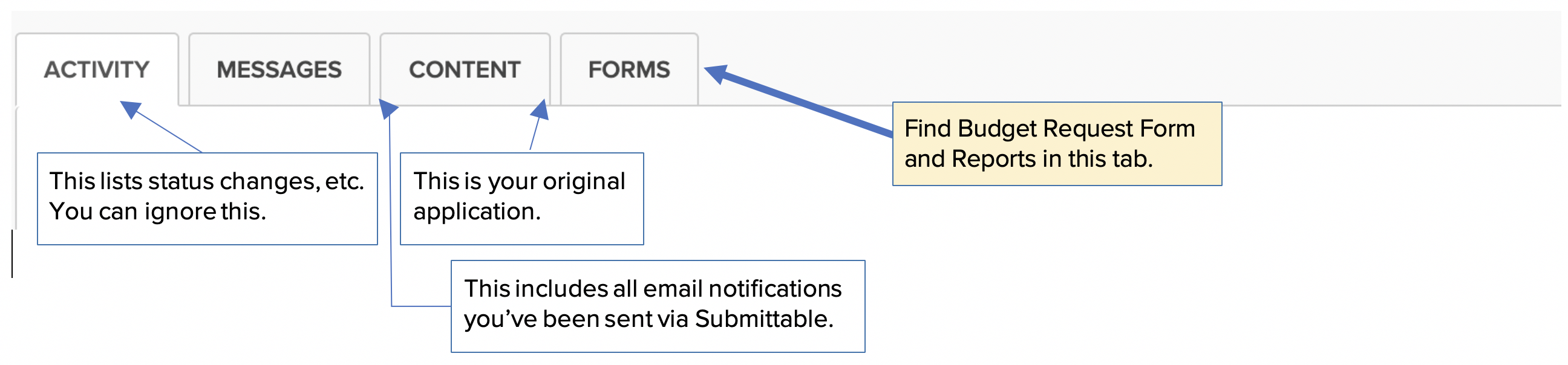
Your grant confirmation letter includes information on your reports and due dates—or just ask if you are not sure. We have moved mainly from written reports to having report conversations with your program officer. However, there are still some cases where may be asked to complete a written form. Forms are connected to your original application, which you can access by logging into Submittable and finding your original application among your submissions.

You'll see a series of tabs. Reports will be in the FORMS tab. 
View of the application in Submittable, showing the tabs. On the far right is the FORMS tab which includes reports.

A note for Film Production grantees:

Once you have completed your project, you are required to complete a final report, which includes your final budget for the work as well as a link/password to view the completed project. If your grant was awarded prior to 2018, please get in touch with Andrea to file your final report.

Nona Faustine, still from Fragments of Evidence.

Nona Faustine, still from Fragments of Evidence.